
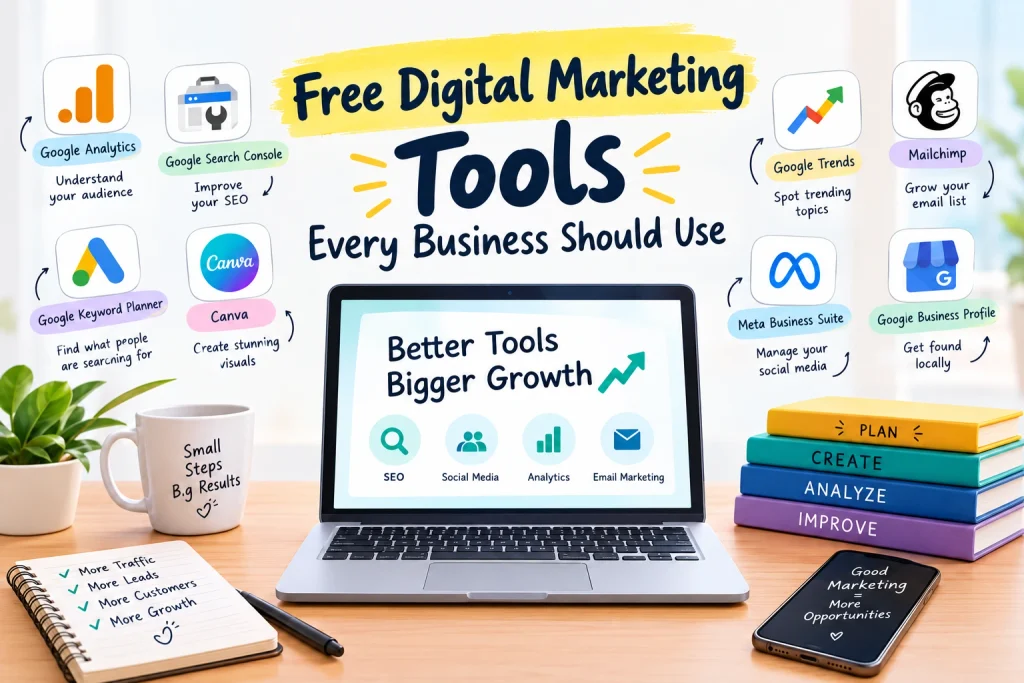
Free Digital Marketing Tools That Can Give Your Business a Serious Boost
Running a business is already a full-time job. Marketing shouldn’t feel like another mountain to climb.
The good news? Free digital marketing tools can help you attract customers, improve your website, create better content, manage social media, and grow your business—without burning through your budget.
You don’t need dozens of expensive platforms. You need the right free digital marketing tools that actually save time and deliver useful results.
From free SEO tools and analytics platforms to social media and content creation tools, there are plenty of options to help your business work smarter, move faster, and get noticed online.
Less spending. More marketing power. Bigger opportunities.
Let’s explore the best free digital marketing tools every business should have in its marketing toolkit.
Free Digital Marketing Tools Every Business Should Use
Running a business is not easy.
You need customers. You need sales. You need good content. You need social media. You need a website that actually gets visitors.
And then comes the big question:
How do you do all of this without spending a fortune?
The answer is simple: use the right free digital marketing tools.
You do not need an expensive marketing team or a huge software budget to get started. Many free marketing tools can help you improve SEO, understand your audience, create content, manage social media, track results, and bring more people to your business.
The trick is not using every tool you find.
The trick is finding the best free digital marketing tools for your actual needs.
So, let’s get into the tools that can make your digital marketing easier, faster, and smarter.
1. Google Analytics – Know What Your Visitors Are Doing
Getting website visitors feels great.
But traffic alone is not enough.
You need to know what those visitors do after they land on your website.
This is where Google Analytics comes in.
It helps you understand your website traffic and visitor behavior. You can learn where visitors are coming from, which pages they visit, and how people interact with your website.
For example, maybe your blog is getting lots of visitors, but your product page is getting very little attention.
That is useful information.
Now you know where to focus.
Instead of guessing, you can make decisions based on actual website data.
Why use it?
Because knowing your audience is the first step toward better marketing.
Best for: Website traffic, audience insights, and performance tracking.
2. Google Search Console – Give Your SEO a Push
Want more people to discover your website through Google?
Then SEO should be on your list.
Google Search Console is one of the most useful free SEO tools for website owners.
It helps you understand how your website appears in Google Search. You can check search queries, clicks, impressions, and the performance of individual pages.
You can also use it to identify certain technical and indexing issues.
Think of it as a health check for your website’s Google search presence.
If a page is getting lots of impressions but very few clicks, you have an opportunity.
Improve the title.
Improve the description.
Make the content more useful.
Then keep watching the results.
Best for: SEO, search performance, indexing, and website visibility.
3. Google Keyword Planner – Find Better Keyword Ideas
Good content starts with a good topic.
But how do you know what people are searching for?
That is where Google Keyword Planner can help.
You can use it to discover keyword ideas related to your business, products, and services.
For example, if you sell fitness products, you could explore searches related to home workouts, fitness equipment, workout plans, or exercise products.
These ideas can help you create:
- Blog posts
- Website pages
- Product content
- SEO content
- Advertising campaigns
But remember:
Do not write for keywords. Write for people.
Use keywords as a guide, then create content that answers the searcher’s real question.
That is how free digital marketing tools become useful instead of just another dashboard.
Best for: Keyword research, SEO planning, and content ideas.
4. Canva – Make Your Marketing Look Better
Let’s be honest.
Nobody wants to stop scrolling for a boring-looking post.
Good visuals grab attention.
Canva makes it easier to create attractive marketing designs without being a professional designer.
You can create social media posts, presentations, posters, flyers, thumbnails, infographics, and many other types of visual content.
You can start with a template, change the text, add your brand details, and create something that looks professional.
And you do not need complicated design skills.
For small businesses, Canva can be a real time-saver.
Create faster. Look better. Post consistently.
Best for: Social media graphics, marketing designs, presentations, and visual content.
5. Google Trends – Find What People Care About
Sometimes the best marketing idea is already gaining attention.
You just need to spot it.
Google Trends can help you explore interest in different topics and search terms over time.
For example, a clothing brand can explore fashion topics. A food business can look at popular food searches. A digital marketing agency can explore growing marketing topics.
This can give you ideas for blogs, social media posts, videos, and campaigns.
But do not blindly chase trends.
A trending topic is useful only when it connects with your audience and business.
The goal is not to follow every trend. The goal is to find the right trend.
Best for: Content ideas, trends, and audience interests.
6. Mailchimp – Start Building Your Email Audience
Social media is great.
But your followers are not completely under your control.
That is why email marketing still matters.
Mailchimp can help businesses get started with email marketing and audience management.
You can use email campaigns to share useful information, product updates, offers, newsletters, and company news.
For example, imagine someone visits your website but does not buy anything.
With permission, you can stay connected through email and give them useful reasons to come back.
Do not send emails just to send emails.
Give people something worth opening.
Useful emails get attention. Boring emails get ignored.
Best for: Email marketing, newsletters, and customer communication.
7. Meta Business Suite – Manage Your Social Media
Managing Facebook and Instagram separately can waste time.
Meta Business Suite helps businesses manage their presence across Meta’s platforms from one place.
You can use available features to create and schedule content, respond to messages, and check performance.
This can make your social media workflow much easier.
Instead of thinking about social media every single day, you can plan your content ahead.
For example:
Monday: Educational post
Wednesday: Product or service post
Friday: Customer-focused post
Simple.
Consistent.
Much easier to manage.
Best for: Facebook and Instagram content, scheduling, messages, and performance.
8. Google Business Profile – Get Found Locally
Do you run a local business?
Then do not ignore Google Business Profile.
When people search for businesses, services, shops, restaurants, salons, agencies, or other local companies, your business profile can help them discover you.
You can add important information such as your business name, address, phone number, website, hours, photos, and services.
Keep everything accurate and updated.
Add good photos.
Respond to reviews.
Make your information easy to understand.
Local customers are already searching.
Your job is to make sure they can find you.
Best for: Local SEO, Google Search, Maps, and nearby customers.
9. Ubersuggest – Explore SEO Opportunities
SEO can feel confusing when you are new to it.
That is where tools such as Ubersuggest can help.
It can provide ideas around keywords, content, and SEO opportunities.
The free version has limitations, but it can still be useful when you are learning the basics.
You might use it to find topic ideas or explore keywords related to your business.
But remember one important rule:
Never let an SEO tool write your strategy for you.
Use the data.
Use your experience.
Use your understanding of your customers.
Then create something useful.
Best for: SEO research, keyword ideas, and content planning.
10. Grammarly – Make Your Writing Clear
A great marketing message can lose its power if people struggle to understand it.
That is why writing matters.
Grammarly can help you find common grammar, spelling, punctuation, and writing issues.
You can use it when writing:
- Blog posts
- Emails
- Social media captions
- Website content
- Product descriptions
- Business messages
But do not try to make your writing sound overly complicated.
Marketing does not need fancy words.
Simple writing is powerful writing.
Write like a human talking to another human.
11. Google Docs – Keep Your Content Organized
Marketing means creating a lot of content.
Blog ideas.
Social media captions.
Email campaigns.
Content plans.
SEO notes.
It can quickly become messy.
Google Docs gives you a simple place to write, edit, store, and share your content.
You can also work with your team on the same document.
No complicated system.
No unnecessary learning curve.
Just open the document and start working.
Sometimes the simplest free digital marketing tools are the ones you use the most.
Best for: Writing, content planning, collaboration, and document management.
12. Trello – Stop Losing Your Marketing Ideas
Ever had a great marketing idea and then completely forgot about it?
It happens.
Trello can help you organize your marketing tasks and ideas.
You can create simple columns such as:
Ideas → To Do → In Progress → Scheduled → Published
Now you can see what needs to be done and what has already been completed.
This is especially useful when you are managing content regularly.
Marketing becomes much easier when your tasks are visible.
Plan it. Do it. Track it.
Best for: Marketing planning, task management, and content workflows.
13. Bitly – Make Your Links Easier to Share
Some website links are ridiculously long.
They look messy and can be difficult to share.
Bitly can help you create shorter links.
Short links can be useful for social media posts, campaigns, promotional materials, and other marketing activities.
It is a small tool, but sometimes small improvements make your marketing cleaner and easier to manage.
Best for: Short links and link sharing.
14. Google Sheets – Track Your Marketing Numbers
You do not need expensive software to track marketing performance.
A simple Google Sheet can do a lot.
You can create a basic marketing dashboard and track things like:
- Website traffic
- Leads
- Social media growth
- Email subscribers
- Blog posts
- Campaign results
- Monthly goals
The important thing is consistency.
Check your numbers regularly.
Find what is working.
Find what is not.
Then make changes.
Marketing gets better when you measure it.
Which Free Digital Marketing Tools Should You Start With?
Here is the important part.
Do not use every tool at once.
That sounds productive, but it can quickly become overwhelming.
Start with the tools that match your business.
If you run a local business:
Start with:
Google Business Profile + Google Analytics + Google Search Console + Canva
If you run an online store:
Try:
Google Analytics + Canva + Google Search Console + email marketing tools
If you focus on content marketing:
Start with:
Google Trends + Keyword Planner + Google Search Console + Grammarly + Canva
If you are just starting:
Keep it simple.
Choose three or four free digital marketing tools and learn them properly.
You do not need 20 dashboards.
You need action.
The Real Power of Free Digital Marketing Tools
Here is the truth.
Tools do not grow businesses. Smart marketing does.
A tool can show you website traffic.
It cannot create a great customer experience.
A keyword tool can give you keyword ideas.
It cannot understand your customers better than you do.
Canva can help you create a beautiful graphic.
It cannot give you a great marketing idea.
That part is still your job.
Use tools to save time, collect useful information, stay organized, and make better decisions.
Then put your energy into what really matters:
Understanding customers. Solving problems. Creating value. Building trust.
Final Thoughts
You do not need a massive marketing budget to start growing online.
You can begin with some of the best free digital marketing tools available and build your marketing system step by step.
Use Google Analytics to understand your visitors.
Use Google Search Console to improve your SEO.
Use Google Keyword Planner to discover search ideas.
Use Canva to create better visuals.
Use Google Trends to spot useful topics.
Use Mailchimp to build relationships through email.
Use Meta Business Suite to manage social media.
Use Google Business Profile to reach local customers.
Use Trello to stay organized.
And use Google Sheets to track your progress.
The goal is not to collect tools.
The goal is to get results.
Start small.
Stay consistent.
Measure your progress.
Improve what is not working.
Keep doing what works.
Because successful digital marketing is not about spending the most money.
It is about making smarter moves with the resources you already have.